The emergence of innovative digital platforms has transformed many traditional work processes and approaches, one of which is the way teams conduct creative brainstorming sessions. In this article, we'll introduce Miro, a popular service among modern businesses for conducting brainstorming sessions using virtual whiteboards and other collaboration tools. You'll learn about the products and solutions it offers, how to effectively brainstorm with Miro, and practical recommendations for enhancing your team’s creative output.
The Evolution of Brainstorming: From Sticky Notes to Digital Boards
Brainstorming sessions are an integral part of the workflow in most modern companies and teams today. They help businesses find fresh ideas and innovative solutions more quickly and efficiently, encouraging employees to express their creativity through collaboration.
The essence of collaborative brainstorming is that a group of participants generates as many ideas or ways to achieve a goal as possible. All options are considered, even those that seem obviously unworkable or unrealistic. At the end of the event, participants collectively evaluate the ideas presented, identifying the best ones.
The brainstorming method was invented by American copywriter Alex Osborn in 1939, and he began applying it in practice at the advertising agency BBDO, where he worked. A key feature of this technique is the prohibition on criticism of any ideas presented, which helps stimulate the participants' creativity.
In the pre-digital era, brainstorming sessions relied on physical tools to visualize and capture ideas. The most common were sticky notes, which were attached to a board, table, or other surface. Other devices were also used for this purpose, including whiteboards, thick paper, flipcharts, and so on.
The advent of the internet and related online communication tools made remote teamwork possible. This led to the widespread adoption of globally distributed workgroups, teams, and companies. New business process formats required a corresponding solution in the form of an online brainstorming tool — a system offering dozens of features for teamwork, planning, analytics, and idea generation.
Source: miro.com
There are many similar services on the market today. Miro is one of the most popular, trusted by millions of users. The platform offers a comprehensive set of tools suitable for various industries, departments, and business types.
What Makes Miro a Game-Changer in Team Collaboration
Miro has gone far beyond basic idea visualization — it has managed to unite creativity, communication, and process management in a single space. Its combination of flexibility, scalability, and sophisticated toolset makes it a true game-changer for teams working in in-person, hybrid, or fully remote settings. Below are the key features and solutions that distinguish Miro from other collaboration and brainstorming platforms.
Applications for Different Platforms
The service is adapted for various platforms and device types, including smartphones and tablets (iOS and Android mobile apps), desktop computers (Windows and Mac apps), and interactive displays (Windows). Miro software can be installed on thousands of devices. Bulk installations of updatable or non-updatable versions of the software for Windows or Mac are available.
Free Visualization of Ideas
Miro provides a virtual space for visual collaboration, where team members can quickly and productively share ideas using sticky notes and mind maps. Sticky notes with ideas or solutions are easily grouped and customized, and can be converted into tasks using the Miro Kanban boards or Jira cards.
The platform also allows you to visualize information using drawings, graphs, and charts, and collaborate on a range of file formats (images, documents, tables, GIFs, and PDFs). You can quickly convert image data into editable sticky notes, CSV files, or Jira tasks.
Powerful Brainstorming Tools

- Automate the work with leads from the Facebook advertising account
- Empower with integrations and instant transfer of leads
- Don't spend money on developers or integrators
- Save time by automating routine tasks
The platform interface offers a range of collaboration tools. This makes it easier to effectively implement a wide variety of brainstorming techniques.
A timer allows you to manage time for individual reflection or group discussion of options. Built-in video chat enables teams to effectively brainstorm online, working together through a shared whiteboard with audio and video support. Video call support is implemented both through built-in and integrated tools.
Miro also makes it possible to customize voting sessions. Users can adjust the duration, number of votes per participant, voting zone, and other parameters.
Large Library of Templates
The Miro templates library for various brainstorming methods and other collaborative formats contains over 6,000 templates of ready-made projects and materials. They are all categorized by topic. Among them, you'll find website and app prototypes and wireframes, graphic design examples, agile roadmaps and Kanban frameworks, diagrams and documents for software architecture development, templates for meetings and workshops, UX research, customer journey maps, and more.
Of particular note are templates for implementing various brainstorming techniques, including mind maps, circle maps, bubble maps, mood boards, spider diagrams, thinking maps, and vision boards.
Flexible Integration with Third-Party Systems
Miro has pre-installed integrations with over 250 of the most well-known and in-demand tools for businesses and professionals. These include Microsoft 365, Atlassian, Google Workspace, Jira, Slack, Confluence, AWS, GitHub, Asana, and many others.
Developers can enable custom integrations to embed its tools into various IT products. The platform's API, SDK, and Miro Live Embed, as well as guides, tutorials, and materials on the forum, GitHub, Discord, and other resources, are designed to speed up and simplify these processes.
Comprehensive AI Support
Built-in AI algorithms effectively optimize and automate a range of processes related to brainstorming and other aspects of collaboration. Teams can add AI-powered assistants, tasking them with generating and editing content, creating summary boards, and transcribing meetings.
With AI, users can more easily and quickly transform information from sticky notes into tables, diagrams into documents, and mood boards into prototypes right in the workspace. Furthermore, custom LLMs can be connected via integrations, and AI tools can be linked to user databases.
How to Organize an Effective Brainstorming Session in Miro
Source: miro.com
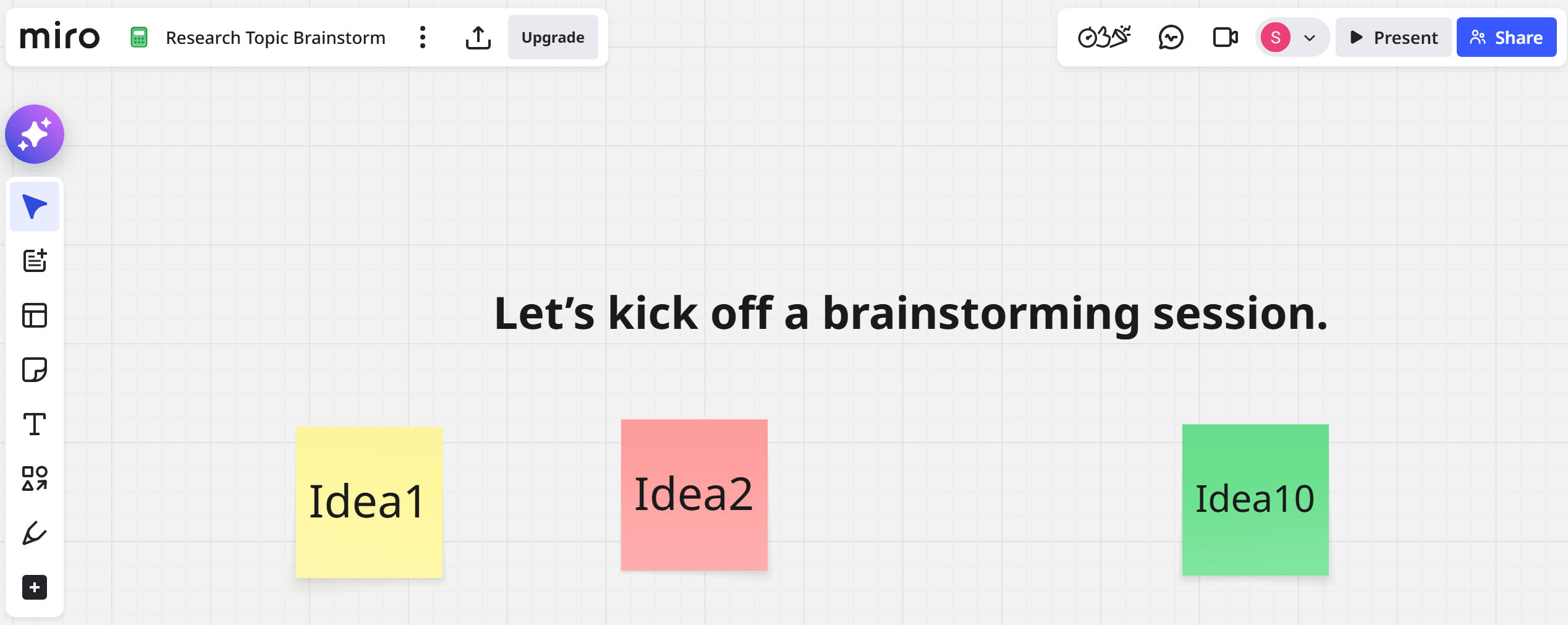
Let's look at how to conduct a productive brainstorming session using Miro whiteboards. To do this, follow these steps:
- Prepare for the event. During the preliminary stage, organizers should define the goals and objectives of the brainstorming session, assemble the team, and create an event agenda outlining the planned stages. It's a good idea to familiarize participants with the event in advance using introductory materials.
- Create a board and invite participants. The board is the main workspace where participants can share their ideas using sticky notes and mind maps. You can create a board from scratch or customize a pre-made template. Invite participants to join the brainstorming session, notifying them of the date and time.
- Conduct a warm-up. We recommend one or more motivating exercises to help the team get participants into a creative mindset and activate their creative mode. You can choose a suitable icebreaker template or other creative task templates from the Miro library.
- Set a timer. The built-in timer in online whiteboard software will help your team effectively manage time for better focus. It will help you accurately time periods allocated for idea generation, voting, and other event stages.
- Generate ideas. Allow participants to express any ideas for solving the assigned task. They can add ideas to the board using sticky notes, marking them with colors, tags, and emoji. The platform also allows you to extract and save information from images using the Sticky Capture feature.
- Organize ideas in mind maps. Once you've collected a suitable set of ideas, organize them using mind maps. This Miro tool helps you quickly and effectively group similar ideas, create branches and nodes, and identify connections between ideas.
- Use reactions for feedback. During brainstorming, participants can instantly evaluate ideas by sending their reactions as emojis. This will increase the interactivity and make the process more engaging.
- Identify the best ideas through voting. The next stage of brainstorming allows all participants or only selected participants (the jury) to select the most original and promising ideas by voting.
- Summarize. At the final stage of the event, the team will discuss key ideas and ways to implement them via the Miro interface's built-in video chat. It can also be used for meetings and other collaborative formats.
Tips and Best Practices for Productive Collaboration
In conclusion, we'll offer a number of recommendations that will help you use digital collaboration tools more effectively and increase the effectiveness of your brainstorming sessions.
- Set clear goals. Before starting a brainstorming session, the team should clearly understand why they are doing it. Create and document clear, measurable goals and use them as a guide as you move through the session.
- Organize your workspace. Miro allows you to customize your workspace to make it as convenient as possible for your team. For example, you can choose a template that matches the topic and goals of your session, customize the board as you go, flexibly sort and tag sticky notes, and more.
- Save sessions and use them as templates. It's a good idea to save each completed virtual whiteboard to your account library. This will allow you to quickly find the ideas presented in them and use them as templates for future sessions of a similar format.
- Encourage active participation. The effectiveness of a brainstorming session directly depends on the active engagement of its participants. Organizers should enforce session rules and encourage the team to actively share their thoughts and evaluate ideas through reactions and voting.
- Create a judgment-free zone. A lack of criticism is the key to a productive session rich in creative ideas. Ensure that participants feel free to express even the boldest and most controversial ideas without fear of criticism or ridicule. They can also use Private Mode to add sticky notes to the board anonymously.
Final Thoughts
The Miro team collaboration platform provides teams with a powerful suite of tools for brainstorming and other collaborative online activities to generate ideas and solve problems. Using whiteboards, video chat, voting, a timer, and other features, participants can conveniently and productively share creative ideas and find the best ways to achieve their goals.
The platform is ideal for teams and companies of all sizes (from startups to corporations). It can be used by various departments (IT, marketing, design, engineering, product management, etc.) and industries (manufacturing, retail, finance, software development, professional services, and many others).
Read more on our blog:
- Vercel Overview: Fast, Scalable Web Deployment Made Simple
- Mastering Firebase: Unlocking the Power of Google’s App Platform
- Cloudflare Demystified: How It Keeps the Internet Fast and Safe
- From Idea to App: Exploring the Power of Bubble.io
- TikTok and Trello Integration: Automatic Conversion of New Leads into Tasks